QTrip
From messy links to beautiful memories.
Turn the map links you collect into one organized itinerary — and come home to an automatic, magazine-style photo memoir.
Coming to the App Store
One entry point, from planning to remembering.
Paste
Drop a Google Maps or Naver Map link. QTrip pulls the name, address, phone, website, and location automatically.
Plan
Arrange your days on a clean, editorial timeline.
Travel
One tap opens the right map app for each country.
Remember
Your photos are matched to the places you visited and laid out like a printed magazine.
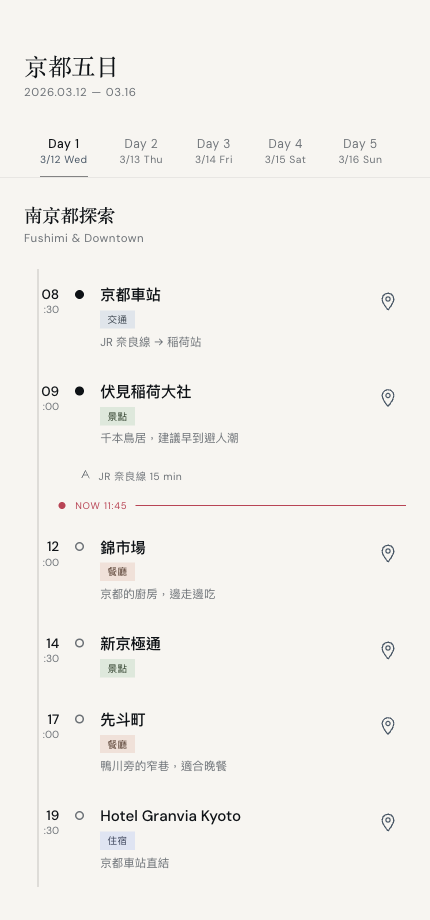
A calm tool while you plan.
A day-by-day timeline with full-width photo heroes, quiet type labels, and one-tap navigation. No clutter — just the trip.
Everything in one place.
Smart link collector
Paste a map link, get a fully detailed place. No retyping.
Automatic photo memoir
Photos matched to your stops by time and location, in an editorial layout.
Daily journal
Add a title and a few words to any day; they flow into your memoir.
Offline maps
Download city tiles and follow your routes without a signal.
Share cards
Turn your trip cover or a single day into a shareable editorial image.
Export
Save your memoir as a PDF or image set, or back up your itinerary.
Built like a magazine you hold in your hands — Japanese minimalism meets Nordic editorial design.
Your trips and photos stay on your device. QTrip works without an account, shows no ads, and uses no third-party tracking.